Problem-solving guide
Best way to keep README accurate as code changes
Tie README updates to release commit windows and generate suggested updates from diff context every cycle.
TL;DR
- • Update per release
- • Map features to README sections
- • Use checklist + review
Problem
README drift causes onboarding and support friction.
Why it happens
- • No owner
- • No release-doc coupling
- • Manual effort
Options
- Occasional cleanup
- Dedicated docs sprint
- Automated README draft + review
Recommended workflow
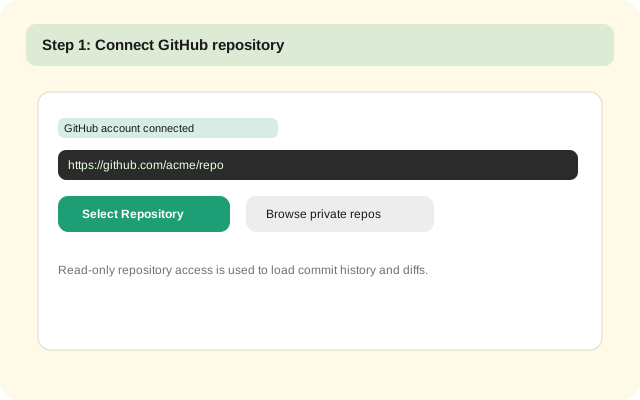
- 1.Connect repository with GitHub OAuth.
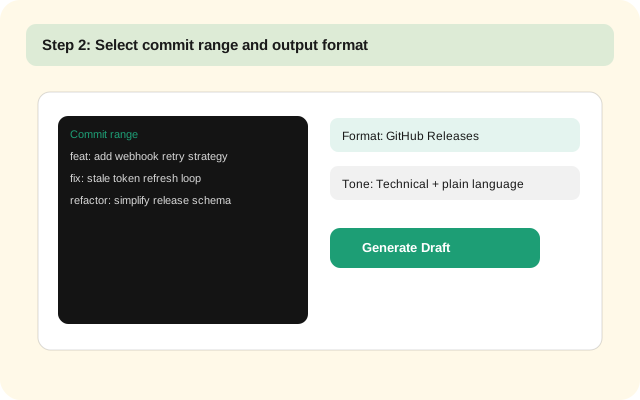
- 2.Select release range by commit window, tag, or merged PR sequence.
- 3.Generate changelog and README draft with Claude from real diffs.
- 4.Review sections for tone and audience clarity.
- 5.Publish to GitHub Releases, CHANGELOG.md, and README.md.
How NoteshipAI solves it
- Proposes README updates
- Keeps technical context
- Supports predictable docs quality
1-minute setup
- 1.Connect repository with GitHub OAuth.
- 2.Select release range by commit window, tag, or merged PR sequence.
- 3.Generate changelog and README draft with Claude from real diffs.
- 4.Review sections for tone and audience clarity.
- 5.Publish to GitHub Releases, CHANGELOG.md, and README.md.
Screenshots
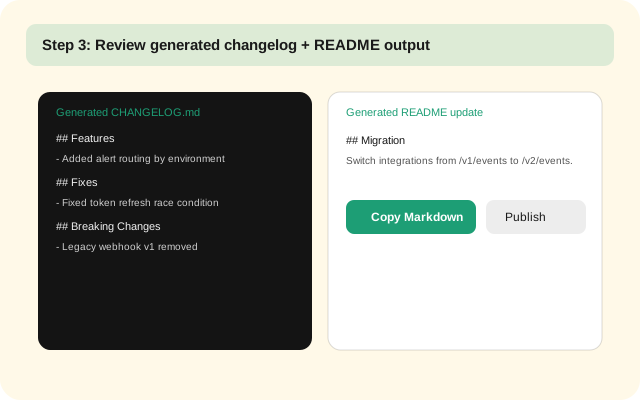
Example: NoteshipAI-generated changelog from commit diffs
Generated CHANGELOG.md
## Features
- Added Slack alert routing by environment with fallback channel handling.

## Fixes
- Fixed race condition in token refresh middleware under burst traffic.

## Breaking Changes
- Removed legacy webhook payload v1 endpoint. Use /v2/events instead.
Generated README section
## Release Notes Workflow
1. Select commits for current release range.
2. Generate draft changelog in NoteshipAI.
3. Review and publish to GitHub Releases.

## Migration
If you use webhook payload v1, switch to /v2/events before upgrading.
Copy/paste templates
- • Keep a Changelog entry template
- • GitHub release notes format template
- • README update checklist for API/integration changes
FAQ
Is it safe to use NoteshipAI with private repositories?
Yes. NoteshipAI uses GitHub OAuth and only reads repository metadata, commit history, and selected diffs needed to generate changelog/README drafts.
Does NoteshipAI actually read file diffs?
Yes. NoteshipAI generates output from commit history and file-level diffs, not only commit titles.
Does this workflow work with monorepos?
Yes. You can scope commit ranges and focus output on the services or directories included in each release.
Try NoteshipAI
Connect your repo, select commit range, and generate changelog + README drafts from real diffs.